


Buying a garage door from a catalog photo is a leap of faith. The panel that looked crisp on a sample page shows up on your house and reads wrong for the era, the trim color, or the roof line.
And now you are locked in for twenty years.
Two of the manufacturers we install offer free online visualizers that put a real door on a real photo of your actual house.
Upload a picture of the front, pick a series and a panel style, adjust color and hardware, and the tool renders the door in place.
Save the preview, bring it to your estimate, and we match it to a real product line and quote it.
The easiest option: text us a photo and we will do the mockup for you!
If you would rather skip the tools entirely, text a photo of your garage door to 303-587-0290 and we will run the mockup for you and text it back.
Tell us the panel style you are drawn to, or the door on a neighbor’s house you like, or just ask us what would suit your home.
Tristan will usually be the one who runs the mockup and texts it back, and we do this for homeowners every week.
The same source-photo rules below still apply: overcast light, square angle, roof and driveway visible. Send the best photo you can and we will work with what you send us.
DoorLink Design Shop
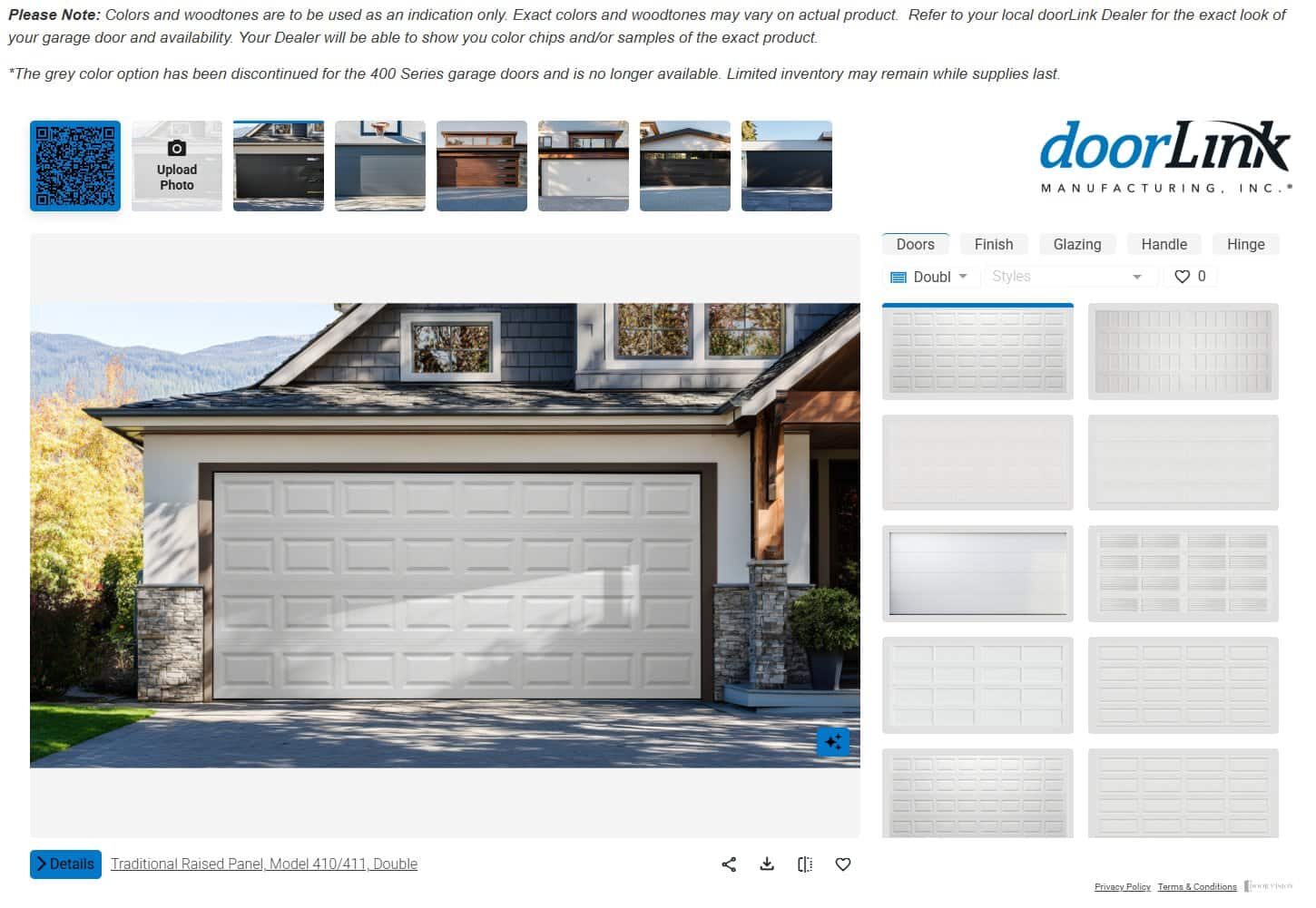
Tool: doorlinkmfg.com/design-shop
Our pick: the door we recommend first for most Denver-metro homes.
DoorLink is the manufacturer we push. The steel is well-made, the insulation and hardware options cover almost every use case a homeowner in this market has, and the price sits in a range that keeps the value clear against comparable doors.
Turnaround from order to install is typically the fastest of the two.
When a homeowner asks us what we would put on our own house, this is the answer.
The Design Shop reflects that. It loads a sample home right away, lets you cycle raised panel, flush, and glass-panel styles on the same photo, and shows the model number for the door you land on so we can quote the exact product.
The interface is lighter than DoorVisions, which matters if you are running it on a phone or an older laptop.
The Design Shop loads its rendering engine inside an iframe from a partner domain. If your browser blocks the iframe, open the underlying URL directly and the tool works normally.
C.H.I. DoorVisions

Tool: doorvisions.chiohd.com
Also great: mid-to-premium residential, carriage-house styles, and wood-look overlays that DoorLink does not carry.
DoorVisions has the strongest panel-by-panel color picker and the most detailed hardware overlays of the two.
You can compare a flush-panel steel door in one browser tab and a carriage-house wood-look door in the next, and both render on the same photo of your house.
The color library covers every current C.H.I. finish, and the hardware overlays include decorative handles, hinges, and window insert styles you can toggle on and off.
When you save the preview, download the PDF and note the C.H.I. series name at the bottom of the page. That series name is what we quote from.
How to get a usable render on the first try
Three things matter more than the tool you pick. The same door photographed two different ways shows why the source photo does most of the work.


Shoot the source photo in flat daylight
Overcast morning is best. Direct afternoon sun bakes the color of the current door into the source image, and any new color you preview will read wrong. Cloud cover flattens the light and lets the visualizer replace the door cleanly.
Stand square to the door
Any angle more than fifteen degrees off center makes the render lean and the panel proportions will read incorrectly.
Back up from the house until the camera is centered on the door and the image fills most of the frame without cropping the top of the opening.
Include the roof line and the ground
The visualizer needs the surrounding building to place the door in scale.
If you crop tight to the door, the render loses context and the panel proportions come out off.
Frame the shot so the top of the roof and the driveway or lawn are both visible.
Bring the preview to your estimate
We do not run any of these visualizers inside our own site. The tools are heavy, they change on the manufacturer’s schedule, and each manufacturer owns the accuracy of their own render.
Instead, we link out to both from our design-your-door page, and we ask you to save your favorite preview and bring it to the estimate.
From there we quote the real product line, real hardware, and real color, and the door we install matches the render.
If you would rather not work through the tools yourself, book an estimate and we will bring a sample kit to your driveway.


